

Reliable email backups. Total privacy. Built for compliance.
Mail Backup is a macOS application designed to protect your email by backing up accounts directly to your local machine. Every email is verified using checksum technology, ensuring each message is captured accurately and only once. No duplicates, no corruption, no guessing.
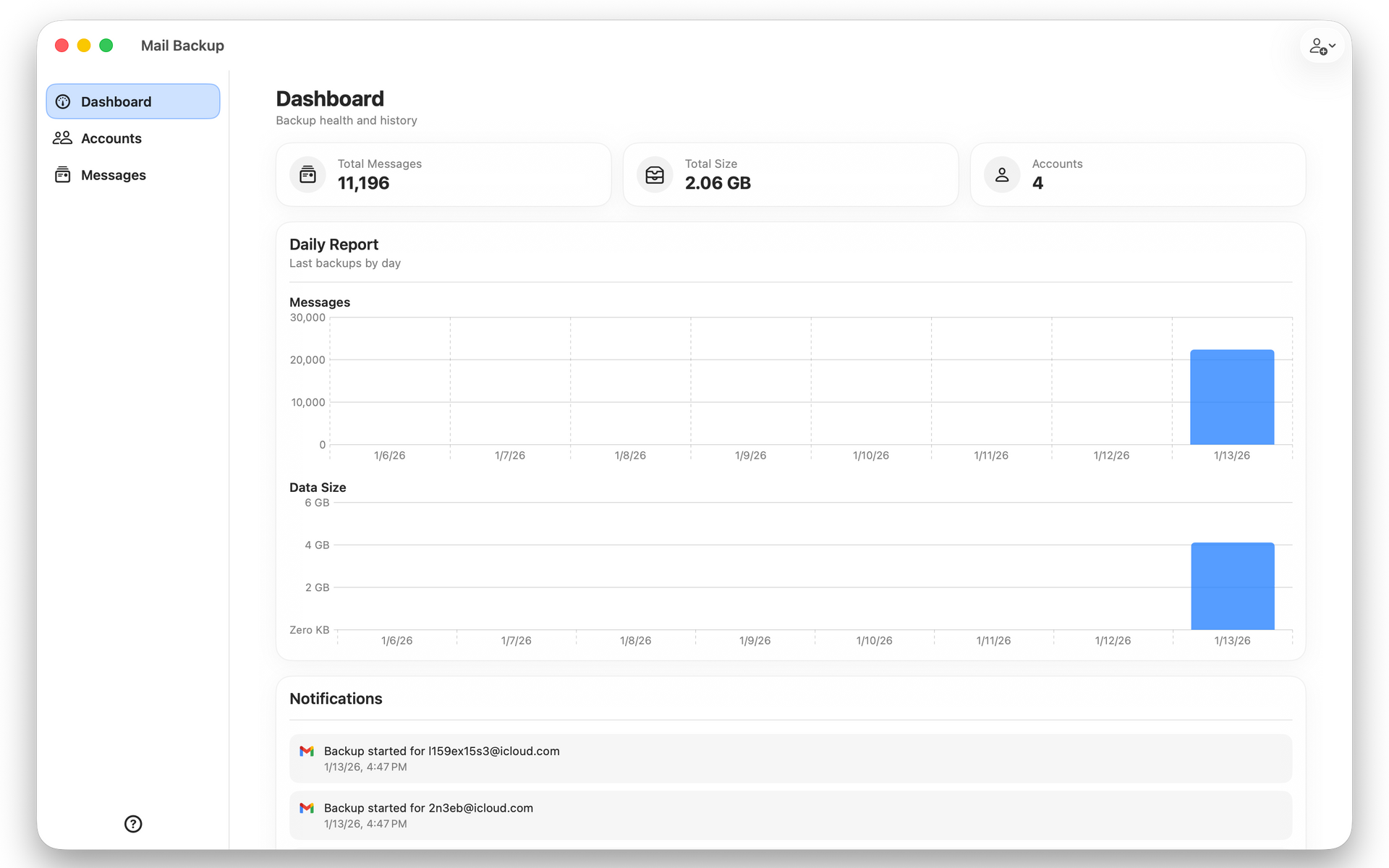
Mail Backup safely backs up email locally with checksum accuracy, scheduled backups, IMAP support, and Apple Keychain security.
Reliable email backups. Total privacy. Built for compliance.
Mail Backup is a macOS application designed to protect your email by backing up accounts directly to your local machine. Every email is verified using checksum technology, ensuring each message is captured accurately and only once. No duplicates, no corruption, no guessing.
Each account can be scheduled to back up on customizable intervals, allowing you to meet personal, professional, or regulatory requirements without manual effort. Whether you need frequent backups or periodic archival, Mail Backup adapts to your workflow.
Mail Backup supports Gmail, Microsoft Office 365, Yahoo, Apple iCloud, and any standard IMAP email provider. Your credentials and authentication tokens are stored securely in Apple Keychain, never transmitted to third parties, and never stored in plaintext.
For businesses, compliance is not optional. Many industries require reliable email retention for audits, legal discovery, and record keeping. Mail Backup helps you stay compliant by maintaining accurate, verifiable, and locally controlled email archives.
Works With Any Email Provider
Supports Gmail, Microsoft Office 365, Yahoo, Apple iCloud, and any IMAP compatible email service.
Multiple Account Support
Back up as many email accounts as you need from one simple, unified interface.
Automatic Scheduled Backups
Set customizable backup intervals so your email is protected automatically without manual effort.
Perfect Accuracy With Checksum Verification
Uses checksum technology to guarantee every email is backed up exactly once with no corruption or duplication.
Local First Storage
All backups are stored directly on your Mac or external drive; no third party cloud storage involved.
Incremental Backup Engine
Only new or changed emails are downloaded, keeping backups fast and efficient.
Secure Credential Storage
All account passwords and OAuth tokens are protected using the macOS Keychain.
OAuth Support for Major Providers
Secure login for Microsoft accounts without storing passwords.
Custom Backup Locations
Choose any folder or external drive as your backup destination.
Detailed Backup Statistics
View backup size, message counts, last backup time, and live backup status per account.
Live Backup Progress Tracking
See real time status updates and messages while backups are running.
Duplicate Message Detection
Prevents storing the same email twice using unique message hashing.
Powerful Search and Filtering
Search backed up emails by subject, sender, folder, and more.
Native macOS Performance
Built specifically for macOS for speed, reliability, and low system overhead.
Menu Bar Access
Quick access to backup status and controls directly from the macOS menu bar.
Privacy First Design
Your email data never leaves your device; no tracking, no data selling, no third party analytics.
Compliance Ready Backups
Helps meet business and legal email retention requirements.
Offline Access to Emails
Read backed up emails anytime, even without an internet connection.
Your email is your data. Mail Backup ensures it stays protected, accurate, and accessible when you need it most.
Works With All Email Providers

"Our small team uses several email providers and things used to get messy. This app keeps every account backed up in one place on our own machines. It has saved us more than once and the setup was easier than we expected."
"Mail Backup gave me real peace of mind. I work with clients every day and my inbox holds years of communication. Having everything stored safely on my computer means I no longer worry about a provider outage or an account lockout."
"I did not realize how much I relied on my old messages until I nearly lost them. The backup tool ran quietly in the background and restored my entire archive when I needed it. It felt like having a personal safety net."
"Our small team uses several email providers and things used to get messy. This app keeps every account backed up in one place on our own machines. It has saved us more than once and the setup was easier than we expected."
"Mail Backup gave me real peace of mind. I work with clients every day and my inbox holds years of communication. Having everything stored safely on my computer means I no longer worry about a provider outage or an account lockout."
Why Choose Mail Backup
Works With Any Email Provider
Mail Backup supports Gmail, Microsoft Office 365, Yahoo, Apple iCloud, and any IMAP compatible email service. If your email can connect via IMAP, Mail Backup can protect it.
True Local Backups
Your emails are saved directly to your Mac. No cloud copies, no third party storage, and no vendor lock in. You always retain full ownership of your data.
Perfect Backup Accuracy
Mail Backup uses checksum technology to ensure every message is backed up exactly once and without corruption. Each email is verified so nothing is missed or duplicated.
Multiple Accounts, One App
Back up as many email accounts as you need from a single, simple interface. Personal, business, and client accounts can all be protected together without mixing data.
Flexible Backup Scheduling
Run backups on your schedule. Choose automatic intervals or manual control to fit your workflow and bandwidth needs.
Designed for Compliance
Businesses are required to retain email records for legal and regulatory compliance. Mail Backup helps you meet retention requirements with reliable, auditable local archives.
Secure by Design
Credentials are stored securely in the Apple Keychain and never exposed. Mail Backup follows macOS security best practices to keep your accounts safe and private.
Fast and Efficient
Incremental backups ensure only new messages are downloaded, saving time and disk space while keeping backups up to date.
Built for macOS
Mail Backup is a native macOS app optimized for performance, stability, and low system overhead. It runs quietly in the background without slowing you down.
Frequently Asked
Questions
-
What is Mail Backup?
Mail Backup is a macOS application that securely backs up your email accounts locally to your computer. It ensures long term access, ownership, and compliance friendly storage of your email data.
-
Does Mail Backup have a free trial
Yes, you can try Mail Backup for free for two accounts, for 7 days.
-
Can I see all of my messages?
Describe the item or answer the question so that site visitors who are interested get more information. You can emphasize this text with bullets, italics or bold, and add links. -
Can backups run automatically?
Describe the item or answer the question so that site visitors who are interested get more information. You can emphasize this text with bullets, italics or bold, and add links. -
Are My Passwords Safe?
Yes, we implement best practices and all sensistive credentials are stored securely in your MacOS Keychain.
-
Which email providers are supported?
Mail Backup supports Gmail, Microsoft Office 365, Yahoo, Apple iCloud, and any email provider that offers IMAP access.
-
Can I back up multiple email accounts?
Yes. Mail Backup supports multiple accounts across different providers, all managed independently with their own schedules and settings.
-
Where are my emails stored?
All backups are stored locally on your Mac in a folder you choose. Your data never passes through third party servers.
-
Does Mail Backup store or transmit my emails to the cloud?
No. Mail Backup is privacy first. Emails are downloaded directly from your provider and stored only on your device.
-
How does Mail Backup ensure backup accuracy?
Mail Backup uses checksum technology to verify each email. This guarantees that every message is backed up exactly once and without corruption or duplication.
-
Can I run backups manually?
Yes. You can start and stop backups at any time in addition to scheduled runs.
-
What happens if a backup is interrupted?
Mail Backup resumes safely. Since each email is tracked and verified, interrupted backups continue without re-downloading existing messages.
-
Does Mail Backup support large mailboxes?
Yes. Mail Backup is designed to handle large inboxes and multi year email histories efficiently.
-
Are attachments included in backups?
Yes. Attachments are backed up along with the email message and included in checksum verification.
-
Is my account information secure?
Yes. All credentials and tokens are stored securely using Apple Keychain and protected by macOS security.
-
Does Mail Backup support OAuth?
Yes. Mail Backup supports OAuth for providers like Google and Microsoft when available, avoiding the need to store passwords.
-
Can I back up newly created folders automatically?
Yes. Mail Backup can automatically detect and back up newly created IMAP folders.
-
Can I choose which folders are backed up?
Yes. You can select specific folders to include or exclude from backups.
-
Is Mail Backup suitable for business compliance?
Yes. Many businesses are required to retain email records. Mail Backup provides local, verifiable backups suitable for audits, legal retention, and compliance needs.
-
Does Mail Backup delete emails from my account?
No. Mail Backup is read only. It never modifies, moves, or deletes messages from your email provider.
-
Can I restore emails from a backup?
Mail Backup stores emails in an accessible format that allows long term access and review. Restoration workflows depend on provider and usage needs.
-
What happens if I change my email password?
You can update credentials in Mail Backup at any time. Existing backups remain intact.
-
Does Mail Backup work offline?
Backups require an internet connection, but your existing backups remain accessible offline.
-
Is there a free trial?
Yes. Mail Backup includes a free trial so you can fully evaluate the product before subscribing.
-
How is Mail Backup licensed?
Mail Backup is available via subscription through the Mac App Store with simple, transparent pricing.
-
Who is Mail Backup for?
Mail Backup is ideal for professionals, businesses, and individuals who need reliable email backups, full data ownership, and privacy first protection.
-
I need help, who can I talk to?
We support our customers in a human way, just email hello@classygeeks.com